
Sysmex XP-100 / XP-300 Bi-Directional LIS Interfacing Guide
Complete engineering specification, HL7/ASTM protocols, pinouts, and parameter mapping for Sysmex XP-100 / XP-300 on AILS Cloud LIMS.
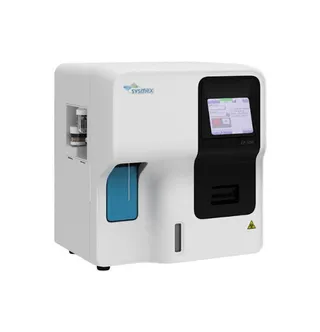
1. Sysmex XP-100 / XP-300 Interfacing Overview & Diagnostic Workflow
The Sysmex XP-100 / XP-300 is an automated hematology platform engineered for high-precision complete blood counts (CBC) and white blood cell differential analysis. In modern clinical laboratory workflows, interfacing the Sysmex XP-100 / XP-300 directly to AILS Cloud LIMS eliminates manual transcription delays, captures full WBC scattergram channel flags (such as immature granulocytes, atypical lymphocytes, and platelet clumps), and validates patient results against historical delta check baselines in real time.
AILS Gateway parses sample accession barcodes from the Sysmex XP-100 / XP-300 data stream, linking multi-parameter CBC results directly to open patient encounter records without manual intervention.
Raw result segments are evaluated instantly against laboratory reference intervals and Westgard multirule delta check algorithms. Critical alerts (e.g. severe thrombocytopenia or extreme leukocytosis) trigger automatic hold flags for pathologist microscopic smear review.
2. Sysmex XP-100 / XP-300 RS-232 Serial Port & Pinout Configuration
DB9 Female Serial Cable. Baud: 9600 bps, 8 Data Bits, Parity None, 1 Stop Bit.
[Instrument DB9]                   [AILS Gateway PC]
Pin 2 (TxD / Data Out) ---------> Pin 2 (RxD / Data In)
Pin 3 (RxD / Data In)  <--------- Pin 3 (TxD / Data Out)
Pin 5 (GND / Signal)   <========> Pin 5 (GND / Signal)
Pin 7 (RTS) & Pin 8 (CTS)        [Loopback or None]
Baud: 9600 bps | Data Bits: 8 | Parity: None | Stop: 1
3. Sysmex XP-100 / XP-300 ASTM E1394 Record Frame
Below is a validated communication frame transmitted between the Sysmex XP-100 / XP-300 and AILS LIS middleware:
<STX>1H|\^&|||Sysmex XP-100|||||||P|1394-97|20260815125000<CR><ETX>4E<CR><LF>
<STX>2P|1||||Brown^Robert|||M<CR><ETX>3A<CR><LF>
<STX>3O|1|ACC2026081507||^^^CBC|||||||A<CR><ETX>4B<CR><LF>
<STX>4R|1|^^^WBC|6.80|10*3/uL|4.0-11.0|N||F<CR><ETX>15<CR><LF>
<STX>5R|2|^^^HGB|14.2|g/dL|13.0-17.0|N||F<CR><ETX>18<CR><LF>
<STX>6R|3|^^^PLT|265|10*3/uL|150-450|N||F<CR><ETX>22<CR><LF>
<STX>7L|1|N<CR><ETX>0A<CR><LF>
4. Sysmex XP-100 / XP-300 Clinical Parameter LOINC & Reference Range Dictionary
| Instrument Code | LOINC Code | Clinical Parameter Name | Standard Units | Default Reference Range |
|---|---|---|---|---|
| WBC | 6690-2 | White Blood Cells | 10*3/uL | 4.0 - 11.0 |
| HGB | 718-7 | Hemoglobin | g/dL | 13.0 - 17.0 |
| PLT | 777-3 | Platelet Count | 10*3/uL | 150 - 450 |
5. Sysmex Biomedical Engineering Field Notes & Gotchas
In XP-100 menu, verify Host Output is configured for ASTM protocol format.
Check that sample barcode ID format matches accession numbers in AILS LIMS.
Ensure AILS COM port auto-reconnect service is active in background.
Frequently Asked Questions: Sysmex XP-100 / XP-300 LIS Interfacing
Common biomedical engineering questions regarding connection, worklist setup, and data capture with AILS Cloud LIMS.
Q: What communication protocol does Sysmex XP-100 use?
Sysmex XP-100 and XP-300 use ASTM E1381/E1394 protocol over RS-232 serial port.
Q: What serial cable is required for Sysmex XP-300?
A DB9 Female-to-Female Null Modem Serial Cable connected to the RS-232 host port.
Q: How does AILS Gateway process ASTM frames from XP-100?
AILS decodes Header, Patient, Order, and Result records between STX and ETX, verifies checksums, and sends ACK.
Q: Can abnormal WBC flags be captured from XP-100?
Yes. Flags such as WL (WBC Low), WH (WBC High), and PL (Platelet Low) in ASTM field 8 are captured as clinical alerts.
Q: Is USB-to-Serial converter supported with Sysmex XP series?
Yes. High-quality FTDI chipset USB-to-RS232 converters are fully supported for continuous 24/7 operation.
Related Hematology Instrument Guides
Compare protocols, pinouts, and parameter mapping dictionaries for comparable diagnostic equipment.
Sysmex XN-1000
High-throughput 5-part differential hematology analyzer. AILS LIMS receives complete CBC + DIFF parameters with automated flag mapping and delta check validation.
Sysmex XN-550 / XN-2000
Compact automated 5-part differential hematology analyzer with integrated auto-sampler. Bi-directional host query pulls test profiles by tube barcode.
Sysmex XS-500i
Compact 5-part hematology analyzer ideal for medium-sized diagnostic centers. Connects directly to AILS RS232 serial middleware for real-time result ingestion.
Connect Your Sysmex XP-100 / XP-300 to AILS in Under 15 Minutes
Our specialized biomedical engineering team provides complete plug-and-play drivers, cable diagrams, and bi-directional test verification for the Sysmex XP-100 / XP-300.