
Selectra Junior Bi-Directional LIS Interfacing Guide
Complete engineering specification, HL7/ASTM protocols, pinouts, and parameter mapping for Selectra Junior on AILS Cloud LIMS.
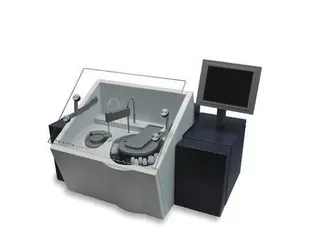
1. Selectra Junior Interfacing Overview & Diagnostic Workflow
The Selectra Junior is a high-performance clinical chemistry analyzer dedicated to routine photometric assays, enzymatic kinetics, and ion-selective electrode (ISE) electrolytes. Connecting the Selectra Junior to AILS Cloud LIMS establishes a closed-loop analytical cycle—automating test profile assignment, monitoring serum index flags (Hemolysis, Icterus, Lipemia), and preventing reporting errors across high-volume chemistry workloads.
Photometric absorbance calculations and ISE potential readings transmitted by the Selectra Junior are ingested in real time, converting raw analyzer voltage/OD readings into calibrated clinical concentrations.
AILS automatically reads HIL (Hemolysis, Icterus, Lipemia) interferent flags emitted by the Selectra Junior, warning technologists when sample integrity compromises photometric accuracy and logging auto-dilution rerun factors.
2. Selectra Junior RS-232 Serial Port & Pinout Configuration
DB9 Female Serial Cable (COM1). Baud: 9600 bps, 8 Data Bits, Parity None, 1 Stop Bit.
[Instrument DB9]                   [AILS Gateway PC]
Pin 2 (TxD / Data Out) ---------> Pin 2 (RxD / Data In)
Pin 3 (RxD / Data In)  <--------- Pin 3 (TxD / Data Out)
Pin 5 (GND / Signal)   <========> Pin 5 (GND / Signal)
Pin 7 (RTS) & Pin 8 (CTS)        [Loopback or None]
Baud: 9600 bps | Data Bits: 8 | Parity: None | Stop: 1
3. Selectra Junior ASTM E1394 Record Frame
Below is a validated communication frame transmitted between the Selectra Junior and AILS LIS middleware:
[SELECTRA_JUNIOR_STREAM]
PATIENT_ID: ACC2026081520
NAME: Scott, Edward
TEST: GLUCOSE = 92.0 mg/dL [Ref: 70-100]
TEST: UREA = 24.5 mg/dL [Ref: 15-45]
TEST: CREATININE = 0.90 mg/dL [Ref: 0.6-1.2]
STATUS: OK
4. Selectra Junior Clinical Parameter LOINC & Reference Range Dictionary
| Instrument Code | LOINC Code | Clinical Parameter Name | Standard Units | Default Reference Range |
|---|---|---|---|---|
| GLU | 2345-7 | Glucose | mg/dL | 70.0 - 100.0 |
| UREA | 3094-0 | Urea | mg/dL | 15.0 - 45.0 |
| CREA | 2160-0 | Creatinine | mg/dL | 0.6 - 1.2 |
5. Vital Scientific Biomedical Engineering Field Notes & Gotchas
In Selectra Junior setup menu, configure Serial Output to Continuous / Real-Time.
AILS Gateway captures raw text strings and parses key-value pairs automatically.
Use shielded serial cable to avoid electromagnetic noise in the laboratory.
Frequently Asked Questions: Selectra Junior LIS Interfacing
Common biomedical engineering questions regarding connection, worklist setup, and data capture with AILS Cloud LIMS.
Q: How does Selectra Junior send test results to LIS?
Selectra Junior outputs structured ASCII text records over its RS-232 serial port upon test completion.
Q: What serial settings are required for Selectra Junior?
Baud Rate: 9600 bps; Data Bits: 8; Parity: None; Stop Bits: 1.
Q: Can Selectra Junior results be imported via CSV file watcher?
Yes. If an export utility saves runs to a local folder, AILS File Watcher can ingest the CSV files automatically.
Q: How does AILS handle calibration and blank readings on Selectra Junior?
Reagent blanks and calibration readings are logged in the QC audit trail without creating false patient reports.
Q: What cable pinout is needed for Selectra Junior DB9 connection?
A standard DB9 Null Modem Cable (Pin 2-Rx, Pin 3-Tx, Pin 5-GND).
Related Biochemistry Instrument Guides
Compare protocols, pinouts, and parameter mapping dictionaries for comparable diagnostic equipment.
Mindray BS-240
Fully automated clinical chemistry analyzer. AILS pushes patient test orders directly to the instrument tray and fetches quantitative biochemistry panel results instantly.
Mindray BS-200E
Automated discrete biochemistry analyzer with bi-directional client socket connection for instant worklist query and quantitative result transmission.
Mindray BS-300
High-speed clinical chemistry platform with 300 tests/hour throughput. Direct HL7 integration allows batch worklist dispatch and multi-wavelength result ingestion.
Connect Your Selectra Junior to AILS in Under 15 Minutes
Our specialized biomedical engineering team provides complete plug-and-play drivers, cable diagrams, and bi-directional test verification for the Selectra Junior.