
Roche Cobas AmpliPrep Bi-Directional LIS Interfacing Guide
Complete engineering specification, HL7/ASTM protocols, pinouts, and parameter mapping for Roche Cobas AmpliPrep on AILS Cloud LIMS.
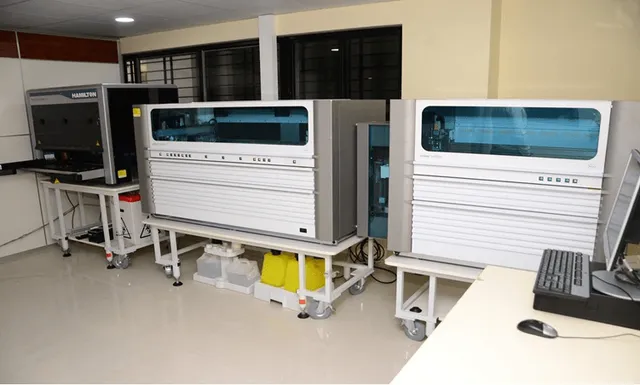
1. Roche Cobas AmpliPrep Interfacing Overview & Diagnostic Workflow
The Roche Cobas AmpliPrep is an advanced diagnostic system utilizing real-time fluorescence thermocycling technology for hormones, tumor markers, cardiac biomarkers, infectious serology, and molecular pathogen detection. Integrating the Roche Cobas AmpliPrep with AILS Cloud LIMS standardizes cut-off index (COI) calculations, calibrator curve tracking, and electronic batch signing.
AILS exports 96-well or 384-well plate setup layouts to the Roche Cobas AmpliPrep, linking sample accession IDs with internal positive/negative amplification controls.
Real-time cycle threshold (Ct) values and baseline-subtracted fluorescence metrics are ingested directly, automatically classifying qualitative pathogen detection (Detected / Not Detected / Indeterminate).
2. Roche Cobas AmpliPrep TCP/IP Socket & Network Configuration
TCP/IP Client Socket Connection (Port 5001). MLLP / ASTM Framing.
[Instrument IP Client]            [AILS Gateway Server]
Socket Address   ------------->  Static IP : Port 5001
Start of Block   ------------->  <VT> ASCII 0x0B
End of Block     ------------->  <FS><CR> ASCII 0x1C 0x0D
Payload Standard ------------->  ASTM E1394 / TCP-IP
KeepAlive Probe  ------------->  Bi-Directional ACK (AA)
3. Roche Cobas AmpliPrep ASTM E1394 Record Frame
Below is a validated communication frame transmitted between the Roche Cobas AmpliPrep and AILS LIS middleware:
<STX>1H|\^&|||Cobas AmpliPrep|||||||P|1394-97|20260815140000<CR><ETX>4D<CR><LF>
<STX>2P|1||||Harris^Mark|||M<CR><ETX>2E<CR><LF>
<STX>3O|1|ACC2026081516||^^^HIV1_PREP|||||||A<CR><ETX>4F<CR><LF>
<STX>4R|1|^^^EXTRACT_STATUS|COMPLETE|||N||F<CR><ETX>3A<CR><LF>
<STX>5L|1|N<CR><ETX>0A<CR><LF>
4. Roche Cobas AmpliPrep Clinical Parameter LOINC & Reference Range Dictionary
| Instrument Code | LOINC Code | Clinical Parameter Name | Standard Units | Default Reference Range |
|---|---|---|---|---|
| EXTRACT_STATUS | 6770-3 | Extraction Batch Status | Status | Completed |
| RACK_ID | 6771-1 | Output Tube Rack Barcode | ID | Valid |
5. Roche Biomedical Engineering Field Notes & Gotchas
AmpliPrep connects as TCP Client to AILS Gateway Server on Port 5001.
Verify that sample rack accession barcodes match extraction batch manifests.
Ensure AILS audit log records operator ID and reagent cassette expiration dates.
Frequently Asked Questions: Roche Cobas AmpliPrep LIS Interfacing
Common biomedical engineering questions regarding connection, worklist setup, and data capture with AILS Cloud LIMS.
Q: What interface protocol does Roche Cobas AmpliPrep use?
Roche Cobas AmpliPrep uses ASTM E1394 protocol over TCP/IP socket connection.
Q: How does AmpliPrep link with downstream PCR instruments (e.g. Cobas TaqMan)?
AILS LIMS links the AmpliPrep extraction tube rack barcode directly to the downstream PCR run plate map.
Q: What parameters are tracked during AmpliPrep extraction?
Sample ID, extraction protocol name, reagent kit lot number, extraction timestamp, and completion status.
Q: Does AmpliPrep support bi-directional worklist verification?
Yes. AmpliPrep queries AILS Gateway to confirm sample tube eligibility before dispensing extraction reagents.
Q: How does AILS handle internal control dispensing validation?
Internal control dispensing confirmation transmitted in the ASTM stream is verified before releasing results for PCR amplification.
Related Immunoassay & PCR Instrument Guides
Compare protocols, pinouts, and parameter mapping dictionaries for comparable diagnostic equipment.
Roche Cobas e411 (Elecsys)
Benchtop ECLIA immunoassay analyzer for thyroid, tumor markers, cardiac biomarkers, and fertility hormones. Complete ASTM result parsing with lot tracking.
GeneXpert XVI / IV System
Automated real-time PCR molecular diagnostic system. AILS automatically links Ct values, qualitative detection, and mutation profiles to patient EHR.
Sysmex XN-1000
High-throughput 5-part differential hematology analyzer. AILS LIMS receives complete CBC + DIFF parameters with automated flag mapping and delta check validation.
Connect Your Roche Cobas AmpliPrep to AILS in Under 15 Minutes
Our specialized biomedical engineering team provides complete plug-and-play drivers, cable diagrams, and bi-directional test verification for the Roche Cobas AmpliPrep.