
Horiba Yumizen H500 / H550 Bi-Directional LIS Interfacing Guide
Complete engineering specification, HL7/ASTM protocols, pinouts, and parameter mapping for Horiba Yumizen H500 / H550 on AILS Cloud LIMS.
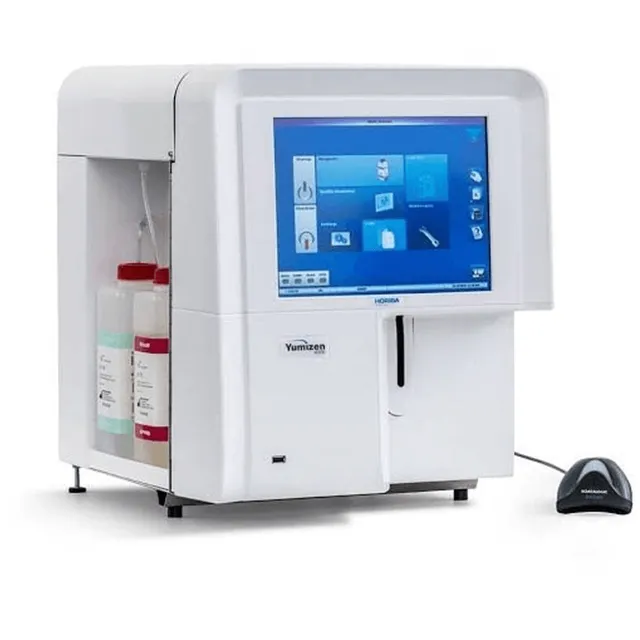
1. Horiba Yumizen H500 / H550 Interfacing Overview & Diagnostic Workflow
The Horiba Yumizen H500 / H550 is an automated hematology platform engineered for high-precision complete blood counts (CBC) and white blood cell differential analysis. In modern clinical laboratory workflows, interfacing the Horiba Yumizen H500 / H550 directly to AILS Cloud LIMS eliminates manual transcription delays, captures full WBC scattergram channel flags (such as immature granulocytes, atypical lymphocytes, and platelet clumps), and validates patient results against historical delta check baselines in real time.
AILS Gateway coordinates with the Horiba Yumizen H500 / H550 auto-sampler and barcode scanner, dispatching QRY^Q02 query responses (DSR^Q03) mapped to patient accession IDs to queue 3-part or 5-part differential testing.
Raw result segments are evaluated instantly against laboratory reference intervals and Westgard multirule delta check algorithms. Critical alerts (e.g. severe thrombocytopenia or extreme leukocytosis) trigger automatic hold flags for pathologist microscopic smear review.
2. Horiba Yumizen H500 / H550 TCP/IP Socket & Network Configuration
Ethernet RJ45 TCP/IP MLLP socket (Port 5001). Static IP configuration.
[Instrument IP Client]            [AILS Gateway Server]
Socket Address   ------------->  Static IP : Port 5001
Start of Block   ------------->  <VT> ASCII 0x0B
End of Block     ------------->  <FS><CR> ASCII 0x1C 0x0D
Payload Standard ------------->  HL7 v2.3.1 / TCP-IP
KeepAlive Probe  ------------->  Bi-Directional ACK (AA)
3. Horiba Yumizen H500 / H550 HL7 v2.x Message Stream
Below is a validated communication frame transmitted between the Horiba Yumizen H500 / H550 and AILS LIS middleware:
MSH|^~\&|YumizenH500|Horiba|AILS_LIMS|LAB_MAIN|20260815144000||ORU^R01|MSG009935|P|2.3.1
PID|1||P982400||Adams^Rachel||19910525|F
OBR|1|ORD982400|ACC2026081528|CBC5D^CBC 5-Diff|||20260815143500
OBX|1|NM|WBC^White Blood Cells||6.85|10*3/uL|4.0-10.0|N|||F
OBX|2|NM|HGB^Hemoglobin||13.9|g/dL|12.0-16.0|N|||F
OBX|3|NM|PLT^Platelets||275|10*3/uL|150-400|N|||F
OBX|4|NM|NEU%^Neutrophils||61.0|%|40.0-75.0|N|||F
OBX|5|NM|LYM%^Lymphocytes||29.5|%|20.0-45.0|N|||F
4. Horiba Yumizen H500 / H550 Clinical Parameter LOINC & Reference Range Dictionary
| Instrument Code | LOINC Code | Clinical Parameter Name | Standard Units | Default Reference Range |
|---|---|---|---|---|
| WBC | 6690-2 | White Blood Cells | 10*3/uL | 4.0 - 10.0 |
| HGB | 718-7 | Hemoglobin | g/dL | 12.0 - 16.0 |
| PLT | 777-3 | Platelets | 10*3/uL | 150 - 400 |
| NEU% | 751-8 | Neutrophils % | % | 40.0 - 75.0 |
5. Horiba Biomedical Engineering Field Notes & Gotchas
In Yumizen H500 menu, select LIS Protocol as HL7 and enter Gateway IP and Port 5001.
AILS Gateway returns ACK^R01 confirmation to complete the transmission handshake.
Check micro-volume tube adapter mode settings if analyzing pediatric tubes.
Frequently Asked Questions: Horiba Yumizen H500 / H550 LIS Interfacing
Common biomedical engineering questions regarding connection, worklist setup, and data capture with AILS Cloud LIMS.
Q: What communication standard is used by Horiba Yumizen H500?
Horiba Yumizen H500 uses HL7 v2.3.1 over TCP/IP MLLP socket.
Q: Does Yumizen H500 support bi-directional worklists?
Yes. Sample tube barcodes are queried against AILS LIMS and test profiles are downloaded automatically.
Q: How are 5-part differential parameters mapped in AILS?
Full 5-part differentials (NEU, LYM, MON, EOS, BAS) in absolute and relative percentages are mapped to LOINC codes.
Q: What throughput is supported on Yumizen H500?
Yumizen H500 processes up to 60 samples per hour in full 5-part differential mode.
Q: Are Yumizen abnormal cell morphology flags recorded?
Yes. Pathology warnings such as Immature Granulocytes and Blast flags are displayed in the review console.
Related Hematology Instrument Guides
Compare protocols, pinouts, and parameter mapping dictionaries for comparable diagnostic equipment.
Sysmex XN-1000
High-throughput 5-part differential hematology analyzer. AILS LIMS receives complete CBC + DIFF parameters with automated flag mapping and delta check validation.
Sysmex XN-550 / XN-2000
Compact automated 5-part differential hematology analyzer with integrated auto-sampler. Bi-directional host query pulls test profiles by tube barcode.
Sysmex XS-500i
Compact 5-part hematology analyzer ideal for medium-sized diagnostic centers. Connects directly to AILS RS232 serial middleware for real-time result ingestion.
Connect Your Horiba Yumizen H500 / H550 to AILS in Under 15 Minutes
Our specialized biomedical engineering team provides complete plug-and-play drivers, cable diagrams, and bi-directional test verification for the Horiba Yumizen H500 / H550.